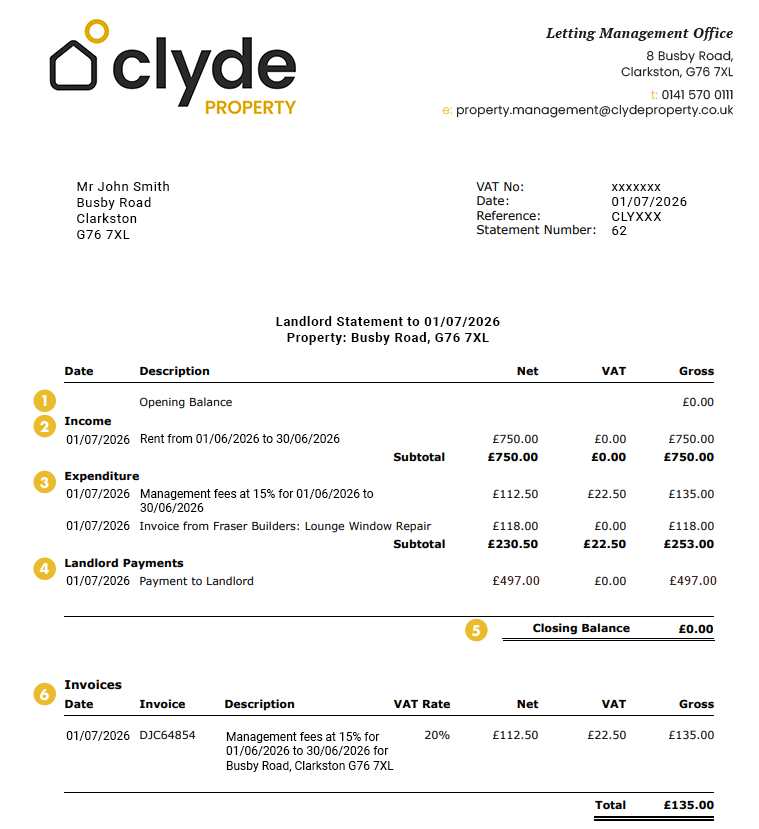
Your landlord statement gives a clear overview of your property’s financial activity. It shows how much rent has been received, what’s been deducted (like fees or repairs), what’s been paid to you and what remains. Invoices are included for transparency and do not include additional charges. Our guide below walks you through each part to help clarify things. If you still have questions, please don’t hesitate to contact the team.
Understanding your rental statement
1. Opening Balance – This is the balance carried forward on the landlord’s account from the previous statement. 2. Income – The income section shows income received. For overseas landlords, it will also show any tax credits. 3. Expenditure – This section shows expenditure that has been deducted from income, such as management fees, supplier invoices, and withheld tax. 4. Landlord Payments – This section shows payments that have been made into the landlord’s bank account. 5. Closing Balance – This shows the funds that are left on the landlord account at the end of the statement. This includes any interest earned, funds on account for works and float withheld. 6. Invoices – Highlights all invoices raised against the landlord. This section provides more information on the invoices that also appear in the payments section of the statement. It also provides an invoice number for the landlord to use for accounting purposes. It is not a duplicate or additional charge.
To access your statements, you will soon be able to log in to your Propertycloud account, click on the Documents tab, and download your statements directly.
Please note that this feature will not be available immediately. In the meantime, your statements will be sent to you by email. Once the Propertycloud document portal is live, you will be able to log in at any time to view your statements whenever you need them.
Should you have any further questions regarding your statement, please do not hesitate to contact the accounts department on letting.accounts@clydeproperty.co.uk.
Your saved properties
No saved property found!
Your saved properties will appear here.
Property Alerts.
Stay one step ahead of the market. Register with us today to receive property alters before the portals.
Register your details and property criteria below, and we will send you updates about homes that match your search criteria.